
🚶 Motion Sensor
Turn on LED strip on motion.
Addressable LED strips enable fantastic light effects. Each LED can be controlled individually with millions of colors!
| Part | Description | Price |
|---|---|---|
| ESP32 DevKit | WiFi microcontroller | $5 |
| WS2812B LED strip | 1m, 60 LEDs/m | $8 |
| 5V power supply | At least 3A | $7 |
| Wires | For power + signal | $2 |
| Total | ~$22 |
| Type | Colors | Recommended |
|---|---|---|
| WS2812B | RGB (16M colors) | ⭐ Good for most |
| SK6812 | RGBW (with true white) | ⭐⭐ Better white |
| WS2811 | RGB (12V version) | Long strips |
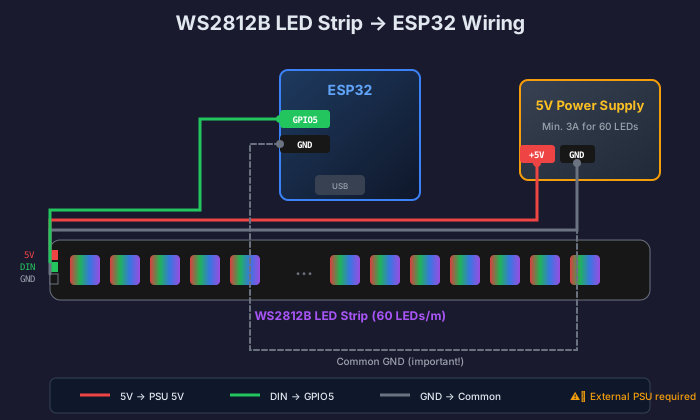
5V from power supply → LED strip +5V
GND from power supply → LED strip GND AND ESP32 GND
GPIO16 from ESP32 → LED strip DIN (Data In)
esphome:  name: led-strip  friendly_name: LED Strip
esp32:  board: esp32dev
logger:api:  encryption:    key: "your-key"ota:  platform: esphome
wifi:  ssid: "your-wifi"  password: "your-password"
# LED Striplight: - platform: neopixelbus type: GRB variant: WS2812 pin: GPIO16 num_leds: 60 name: "LED Strip"esphome: name: led-strip friendly_name: LED Strip
esp32: board: esp32dev
logger:api: encryption: key: "your-key"ota: platform: esphome
wifi: ssid: "your-wifi" password: "your-password"
# LED Strip with effectslight: - platform: neopixelbus type: GRB variant: WS2812 pin: GPIO16 num_leds: 60 name: "LED Strip" effects: - rainbow: name: "Rainbow" speed: 10 width: 50 - pulse: name: "Pulse" min_brightness: 20% max_brightness: 100% - color_wipe: name: "Color Sweep" - strobe: name: "Strobe" colors: - state: true duration: 50ms - state: false duration: 50mslight: - platform: neopixelbus type: GRBW variant: SK6812 pin: GPIO16 num_leds: 60 name: "LED Strip RGBW"Click INSTALL → Wirelessly
Go to Home Assistant → Overview
Find your LED strip and turn it on
Try changing color and selecting effects
type: lightentity: light.led_stripname: LED Stripautomation: - alias: "Ambient light at sunset" trigger: - platform: sun event: sunset action: - service: light.turn_on target: entity_id: light.led_strip data: brightness_pct: 50 rgb_color: [255, 180, 100] # Warm whiteautomation: - alias: "Red alarm" trigger: - platform: state entity_id: alarm_control_panel.home to: "triggered" action: - service: light.turn_on target: entity_id: light.led_strip data: effect: "Strobe" rgb_color: [255, 0, 0]WLED is firmware with 100+ effects and web app:
| Feature | ESPHome | WLED |
|---|---|---|
| Effects | ~10 | 100+ |
| Web UI | No | Yes |
| Music sync | No | Yes |
| HA integration | Perfect | Good |
| Setup | YAML | Web |
🚶 Motion Sensor
Turn on LED strip on motion.
🤖 Automations
Advanced automations in Home Assistant.