
⚡ Your first automation
Learn to create automations that make your home smart.
Raspberry Pi is the most popular way to run Home Assistant. Cheap, silent, and uses only 5-10W of power.
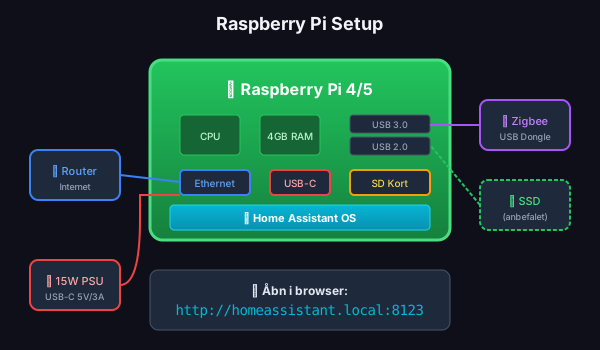
| Part | Description | Price |
|---|---|---|
| Raspberry Pi 4 (4GB) | Recommended model | ~$55 |
| Power supply | Official 15W USB-C | ~$15 |
| SD card 32GB+ | Samsung EVO or SanDisk | ~$10 |
| Ethernet cable | Cat5e/Cat6 | ~$5 |
| Total | ~$85 |
| Part | Why | Price |
|---|---|---|
| SSD + USB adapter | Faster, lasts longer | ~$30 |
| Heatsink/fan | Keeps Pi cool | ~$10 |
| Case | Protection and aesthetics | ~$15 |
Download Raspberry Pi Imager
Get it from raspberrypi.com/software
Insert SD card into computer
Open Raspberry Pi Imager
Choose operating system:
Select your SD card:
Flash:
Insert SD card into Raspberry Pi
The card slot is on the bottom of the board.
Connect Ethernet cable
Direct to your router for most stable connection.
Connect power (last!)
Use the official power supply. Cheap chargers can cause problems.
Open your browser and go to:
http://homeassistant.local:8123If homeassistant.local doesn’t work:
http://192.168.X.XXX:8123You’ll first see “Preparing Home Assistant” - wait 10-20 minutes.
Create your account
Name your home
E.g., “My Home” or your address.
Set location
Used for sunrise/sunset, weather, and timezone.
Choose what to share
Anonymous statistics - completely voluntary.
Discovered devices
Home Assistant automatically finds devices on your network. Click “Finish” for now.
🎉 Congratulations! Home Assistant is now running.
Go to Settings → Add-ons → Add-on store:
| Add-on | What it does |
|---|---|
| File Editor | Edit config files in browser |
| Terminal & SSH | Command line access |
| Samba share | Access files from Windows/Mac |
SD cards are the #1 cause of Home Assistant problems. An SSD costs ~$30 and lasts many years.
⚡ Your first automation
Learn to create automations that make your home smart.
📡 Zigbee2MQTT
Add IKEA, Aqara and other Zigbee devices.